A Teleparty alternative with no extension
Teleparty keeps everyone’s own streaming player in step through a browser extension. Walnut works the other way round: one shared screen for the whole room, with nothing to install. That makes it easier for free sites and impossible for Netflix. Here’s which to use when.
Free, in your browser. No account needed: just pick a name.
We make Walnut, so read this with that in mind. What we say about other products comes from their own sites and app store pages as of November 2026. Products change often; check their sites for the details today.
Two different ideas
Teleparty is a browser extension. Each person opens the same show on their own account of a supported streaming service, and the extension keeps the players in step, with a chat beside them.
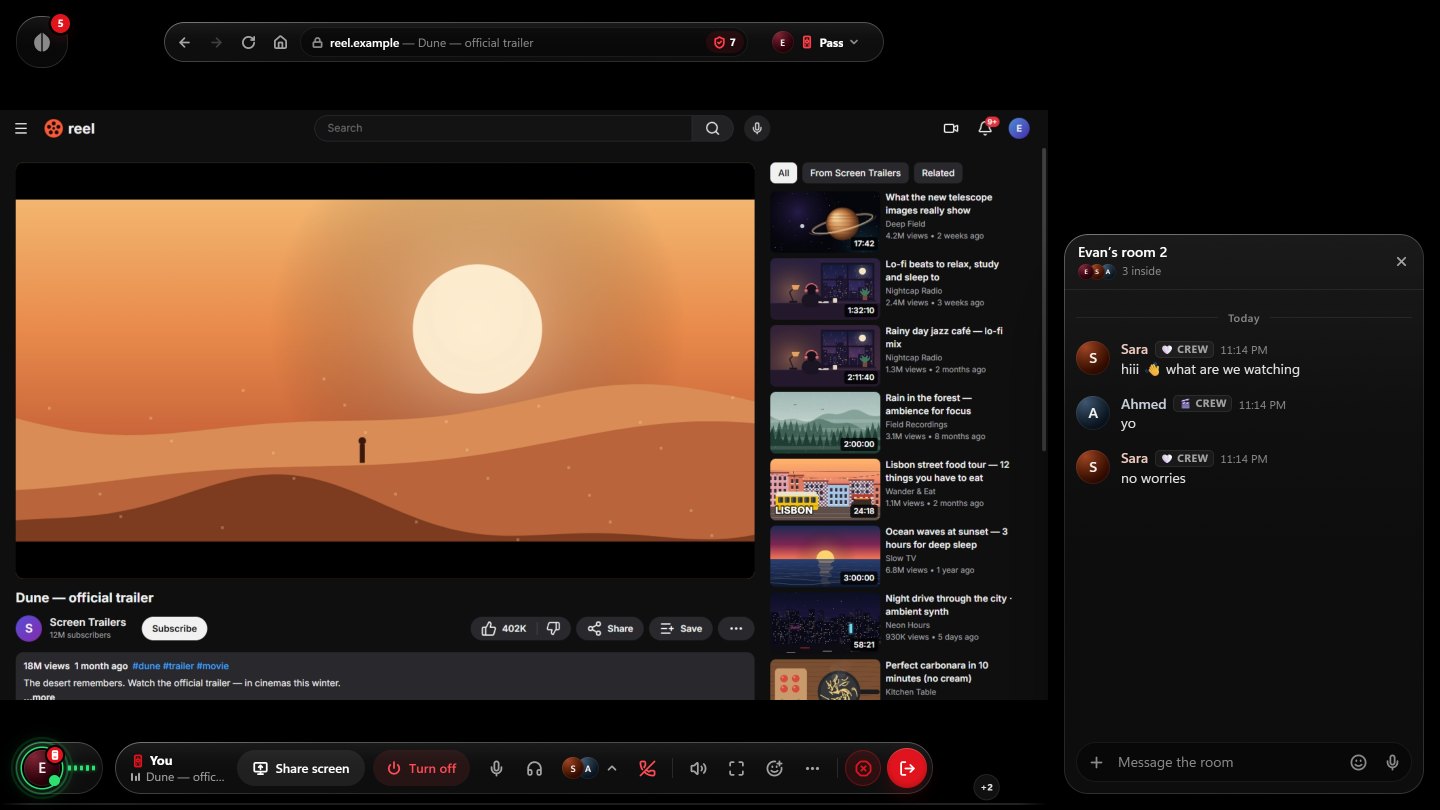
Walnut is a room built around one screen. Put a YouTube link on it and everyone’s player plays in sync. Press Start on the TV and the room shares one browser in the cloud. Or share your screen. Voice chat runs alongside.
| Walnut | Teleparty | |
|---|---|---|
| To join | A name, in any browser | The extension, in a supported computer browser |
| Account | Not needed | Your own subscription to the service you watch |
| Netflix, Disney+, Prime Video | No: DRM shows black on a shared screen | Yes, each on their own account |
| YouTube | In sync, or browsed together on the TV | See their site |
| Any other website | Yes, on the room’s shared browser | Supported services |
| On a phone | Watch and talk in the browser | See their site |
| Voice chat | Built in | See their site |
| Paid plan | Plus, $4.99 a month | Premium, $6.59 a month |
Where Walnut is easier
No extension
Nobody installs anything. That matters for the friend on a work laptop, the one on a Chromebook managed by school, and anyone who joins from a phone. They open your link, type a name, and they’re in.
No account, and nobody needs their own subscription for free sites
On Walnut’s TV, one browser plays the page for the whole room. For free sites, such as YouTube, a live stream on Twitch, or a trailer on a studio’s site, nobody needs to sign in anywhere or pay for anything. Ads and trackers are blocked for everyone.
More than streaming services
Because the TV is a whole browser, the room can do things that aren’t a show: look through flats, plan a trip on a map, read the same article. And anyone can share their screen, with sound in Chrome, Edge and Walnut for Windows.
Where Teleparty is the right tool: Netflix and DRM
This is the honest part. Netflix, Disney+, Prime Video, Max and most paid services protect their video with DRM. A browser decodes the picture so that only your own screen can show it, and anything that captures it, a shared browser or a screen share, gets a black rectangle.
So Walnut can’t show Netflix, on any plan. Walnut’s TV notices when a site asks for DRM and tells the room it can’t be shared, rather than showing everyone black. Streaming services’ own terms also generally say an account is for one household.
Teleparty avoids the problem by not sharing the picture at all: each person plays their own. If Netflix-style services are most of what your group watches, use Teleparty, or simply press play together on a call. Watching Netflix together: what works.
Using both
Plenty of groups do. Play the episode through Teleparty, and keep a Walnut open for the voice call, which has noise suppression, echo cancellation and a volume for each person. Afterwards, put the cast interviews and the theories on the TV from YouTube, in sync for everyone.
Honest limits of Walnut
- No Netflix or other DRM services, on the shared screen or in a screen share.
- The shared browser streams one picture to everyone at 720p on the free plan (1080p with Plus), at 30 frames a second. A synced YouTube link looks sharper, because each person streams it on their own connection.
- Free shared-browser sessions last up to 45 minutes, with a line when every TV is busy. Walnut Plus runs them for up to 3 hours.
Questions
Can Walnut play Netflix like Teleparty?
No. Netflix protects its video with DRM, which shows black in any shared browser or screen share, Walnut’s included. Teleparty works because each person plays Netflix on their own account. More on Netflix.
Do I need an extension for Walnut?
No. Walnut runs in Chrome, Edge, Firefox and Safari as it is, on computers and phones.
Do my friends need a subscription?
Not for free sites like YouTube. On Walnut’s TV, one browser plays the site for the whole room.
Can we use both?
Yes. Many groups play Netflix through Teleparty or by pressing play together, and use a Walnut for the voice call and for everything that isn’t behind DRM.
Pick a name, send the link, press play.
Walnut is free in your browser at easywalnut.com, with no account needed, and for Windows. Start a Walnut and send your friends the link.