How to host an online watch party
A watch party is friends in different places watching the same thing at the same moment and talking over it. Here’s how to run one in Walnut, what you can put on the screen, and how to pick the right tool if Walnut isn’t it.
Free, in your browser. No account needed: just pick a name.
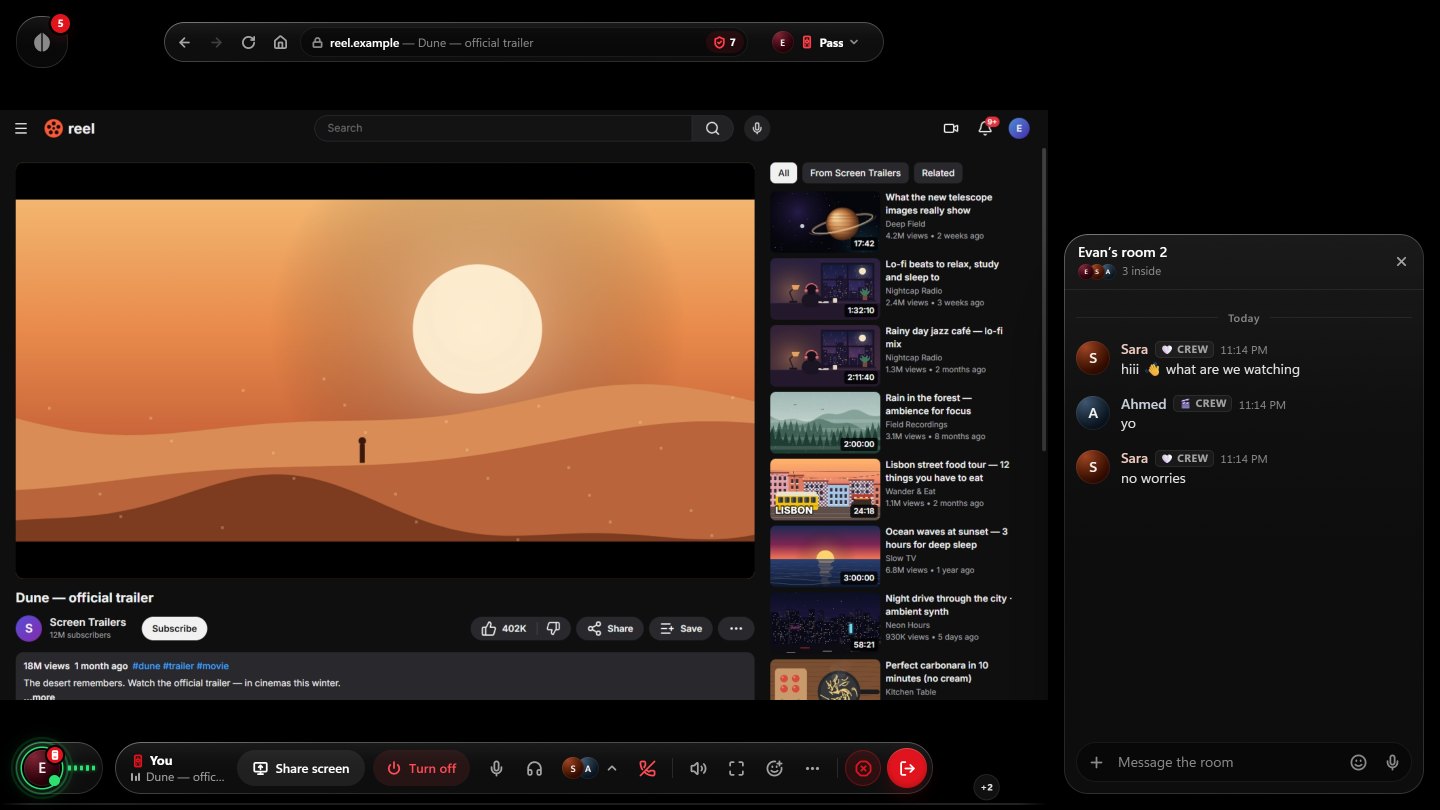
Host one in five steps
- Open Walnut at easywalnut.com and pick a name. No account and nothing to install.
- Start a Walnut and send your friends the link, or read them the room’s code.
- Join voice and ask everyone to wear headphones, so nobody’s speakers echo into the call.
- Put something on the screen: paste a YouTube link to play it in sync, press Start on the TV to browse together, or share your screen.
- Count it in. Start a countdown so the film begins at the same moment for everyone, then talk over it.
Your friends don’t need anything but a browser: Chrome, Edge, Firefox or Safari, on a computer or a phone. They open your link, type a name, and they’re in.
Three ways to put something on the screen
A Walnut has one big screen in the middle. There are three ways to fill it, and you can switch between them during the night.
1. A video in sync
Paste a YouTube link or a direct video link (MP4, WebM, MOV or an HLS stream). Every person’s player starts it together, each on their own connection, so everyone gets the best picture their internet allows. Pause, seek or skip and it happens for the whole room. Line up what’s next in the queue. Watching YouTube together.
2. The room’s TV, a shared browser
Press Start on the TV and the room gets a real web browser that everyone sees. Whoever holds the remote drives it, and can pass it on. Ads and trackers are blocked for everyone. It’s the way to watch a live stream together, scroll through trailers, or use any site that doesn’t have a sync feature. Browsing together.
3. Someone’s screen
Share a screen, a window or a tab. Chrome and Edge share a tab with its sound; Walnut for Windows shares any window with sound. Good for your own videos, a game, or photos. Screen sharing.
What works, by where the video lives
| Best way in Walnut | Notes | |
|---|---|---|
| YouTube | Sync the link | Or browse YouTube on the TV, with ads blocked |
| Twitch and live streams | The TV | Watching Twitch together |
| A video file on your computer | Share your screen | With sound from Chrome, Edge or the Windows app |
| A direct video link (MP4, HLS) | Sync the link | Each person streams it on their own connection |
| Netflix, Disney+, Prime Video | Not on the shared screen | DRM shows black. Each person plays it on their own account. How |
| Anime on free sites without DRM | The TV | Watching anime together |
Tips for a good night
- Headphones for everyone. Walnut’s echo cancellation is good, but nothing beats sound that never reaches a microphone.
- Use the countdown. A film that starts at the same moment for everyone feels like a cinema; one that starts “now… now… now” doesn’t.
- Pick before you press play. Put trailers on the TV and vote. The person holding the remote has the final say.
- Pass the remote. Anyone can ask for it. Taking turns choosing keeps everyone involved.
- Keep the room. A Walnut stays open for 24 hours after the last person leaves, so you can come back after a break. With Walnut Plus, your room gets a permanent link.
Planning something specific? See how to host an online movie night or ideas for long-distance dates.
Other watch party apps
Walnut is one way to do this, and it isn’t right for every group. If you mostly watch Netflix or Disney+, a sync extension such as Teleparty, where everyone plays from their own account, fits better. If you want games inside the room, a service like Kosmi has them and Walnut doesn’t. Watch2Gether is quick for YouTube. The best watch party apps, compared, says where each one is strong and where Walnut falls short.
Honest limits
- DRM video can’t be shown on the shared screen, on any plan.
- Phones and tablets can watch and talk, but can’t share their screen.
- On the free plan, the shared browser runs for up to 45 minutes at a time at 720p, and may have a short wait when every TV is busy. Synced videos and screen sharing have no such limit.
- Walnut has no Mac, iPhone or Android app. Everything works in the browser, and there’s an app for Windows.
Questions
What is a watch party?
Friends in different places watching the same thing at the same moment, and talking or typing about it as it plays.
Is a Walnut watch party free?
Yes. Rooms, synced YouTube, screen sharing, voice and chat are free, with no account. Walnut Plus adds more time and a sharper picture on the shared browser.
How many people can join?
Up to 16 in a free room, you included. Rooms with a Walnut Plus member can hold more.
Can we have a Netflix watch party in Walnut?
Not on the shared screen. Netflix uses DRM, which shows black in any shared browser or screen share. Each person can play it on their own account while you talk in a Walnut. How.
Can friends join from a phone?
Yes, in the phone’s browser, to watch and talk. Sharing a screen needs a computer.
Pick a name, send the link, press play.
Walnut is free in your browser at easywalnut.com, with no account needed, and for Windows. Start a Walnut and send your friends the link.